
Product creative automation for ecommerce
Product photos in.
Ecommerce creatives out.
Turn product photos into ads, banners, listing images, and catalog assets — one template, every product.
Preview any template free·Full workflow on signup
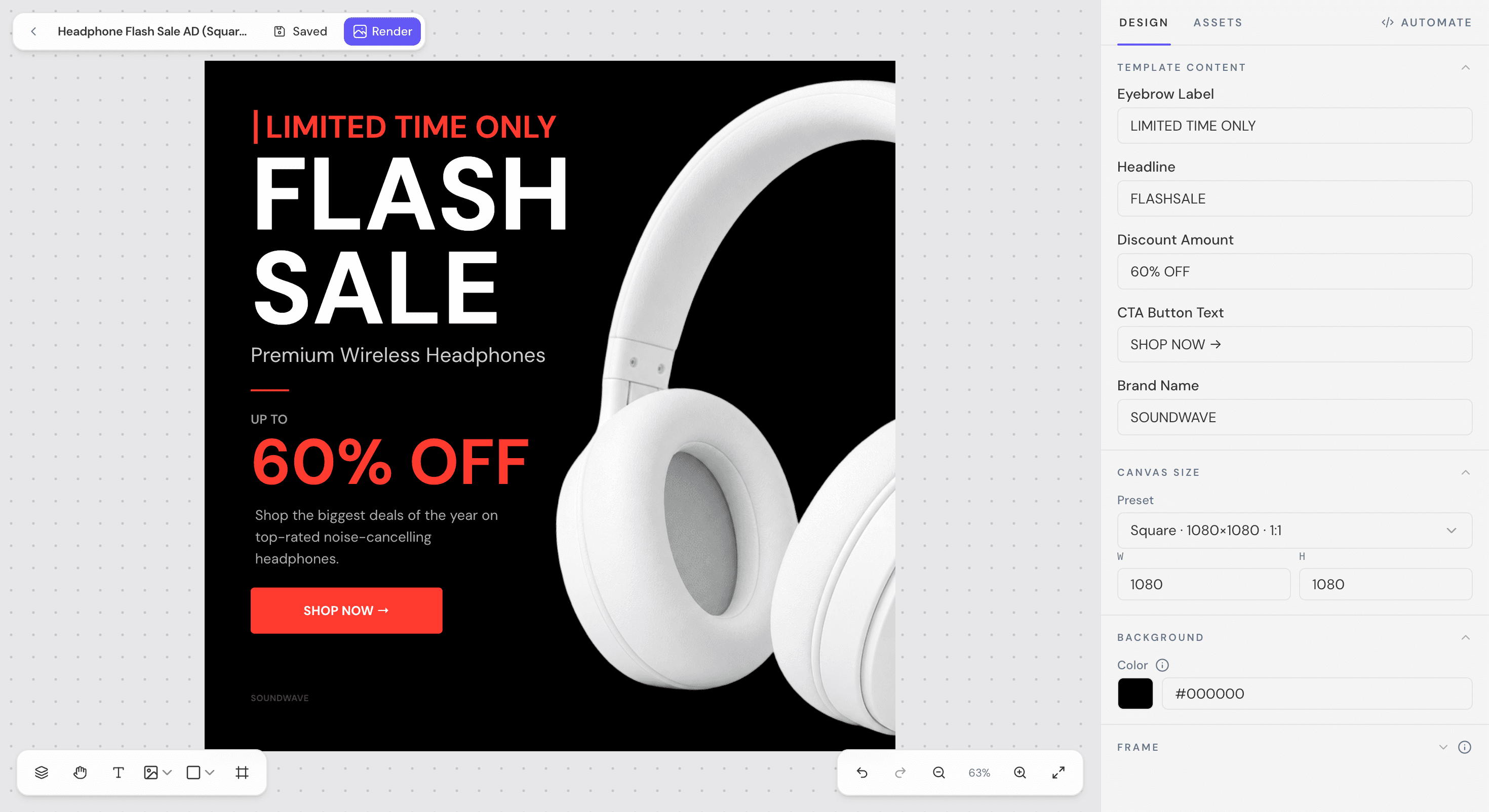
01/Built for
Made for ecommerce teams
Reusable workflows per brand, so new product folders become finished campaigns.
02/Templates
Start from a template
Preview any template free, with a watermark. Sign up to run the full workflow.


Ecommerce Banners
Shopify banners, promo cards, and campaign creatives for product launches.
03/How it works
Pick a template. Run it on every product.
Preview any template free. Sign up to run the full workflow across your catalog.
Pick a template
Browse ad, banner, listing, and catalog templates. Preview one free, with a watermark.
Sign up to run it
Clean up product photos and map your fields — name, price, image, logo — once.
Connect your products
Upload photos or a CSV. Each product maps into the same template.
Generate in bulk
Export finished, watermark-free creatives for your whole catalog.
04/Features
From product photo to finished creative
Prep
Clean product photos before they hit a template.
- Product image cleanup
Remove backgrounds and prep product shots inside the editor.
- Center, crop & resize
Fit any product shot to ad, social, email, and print sizes.
Template
Design one reusable layout, use it for every product.
- Visual template editor
Design sale banners, ads, and listings in a browser canvas — no desktop app.
- Dynamic product fields
Bind product name, price, image, logo, and brand color so every render stays on-brand.
- Saved templates
Save layouts and field maps to reopen and rerun when the next catalog drops.
Connect data
Point Zaprender at your products.
- CSV import
One row per product in, one finished creative out.
- Google SheetsComing soon
Map sheet columns to template fields on Business plans.
- Google Drive foldersComing soon
Import a folder of product photos and run a saved workflow end to end.
Scale
Turn one template into your whole catalog.
- Bulk rendering
Generate hundreds of watermark-free creatives from a CSV, delivered as a ZIP.
- REST API
Render any saved template from your app or automation stack. Webhooks coming soon.
- n8n & automations
Trigger renders from any workflow. Zapier and Make coming soon.
05/Where Zaprender fits
Not a photo editor. Not a one-off design tool. A workflow product.
| Tool type | What they do | What Zaprender does |
|---|---|---|
| Photo editors | Clean individual product images. | Prep images, then slot them into repeatable ecommerce templates. |
| Design tools | Help you design one creative at a time. | Turn one template into hundreds of product-specific outputs. |
| Template APIs | Render images from JSON payloads. | Give non-developers a visual editor, then scale the same template via CSV or API. |
| Catalog ad platforms | Focus on dynamic paid-media catalog ads. | Cover the full path from product photos to ads, banners, listings, email, and social assets. |
06/Pricing
Free to preview. Pay to run it.
Preview any template with a watermark, no signup. Sign up to run the workflow — cleanup, bulk rendering, and saved workflows.
Try before you sign up
- No signup required
- Preview any template
- Watermarked sample export
Ecommerce teams & agencies
- No watermark
- Bulk CSV rendering
- Saved templates
- REST API & API keys
- 5,000 renders / month
High-volume catalogs
- Everything in Pro
- Higher bulk row limits
- Google Sheets automation
- Priority rendering queue
- Webhooks (coming soon)
FAQ
Automate
One template in.
Every creative out.
Set up a workflow once, then render ads, banners, and listing images for your entire catalog — from a spreadsheet, a Drive folder, or on a schedule.
CSV & Google Sheets·Drive folders in & out·No code needed